Choose your languageand country
German
English
Polish
OK
AABCOOLING NC80
AABCOOLING NC80
AABCOOLING NC80
AABCOOLING NC80
AABCOOLING NC80
AABCOOLING NC80
AABCOOLING NC80
AABCOOLING NC80
AABCOOLING NC80
AABCOOLING NC80
AABCOOLING NC80
AABCOOLING NC80
AABCOOLING NC80
AABCOOLING NC80
AABCOOLING NC80
AABCOOLING NC80
AABCOOLING NC80
AABCOOLING NC80
AABCOOLING NC80
AABCOOLING NC80
AABCOOLING NC80
AABCOOLING NC80
AABCOOLING NC80
AABCOOLING NC80
AABCOOLING NC80
AABCOOLING NC80
AABCOOLING NC80
AABCOOLING NC80
AABCOOLING NC80
AABCOOLING NC80
AABCOOLING NC80
AABCOOLING NC80
AABCOOLING NC80
AABCOOLING NC80

AABCOOLING NC80

  • AABCOOLING NC80 laptop cooling pad: 2 × 125 mm fans with blue LED, quiet operation from 11 dB(A), 5-level tilt adjustment, anti-slip stoppers. For laptops 15.6"–18.4".

£7.33

incl. VAT / 1piece
Lowest price in 30 days before discount: / piece
Regular price: / piece
:
You can buy for pts.
of
You can also buy using:
Contact the shop staff, in order to estimate time of preparing this product for shipment.
Shipment
30 days for easy returns
Safe shopping
After purchase you will receive pts.

AABCOOLING NC80 – laptop cooling pad

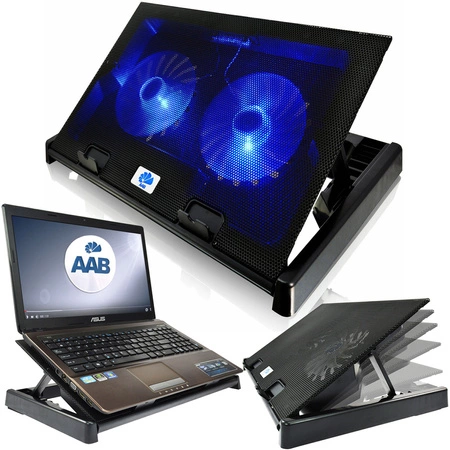
AABCOOLING NC80 is a quiet laptop cooling pad with 2 × 125 mm fans and blue LED lighting. The fans draw cool air from beneath the pad and direct it onto the underside of the laptop, lowering the temperature of the casing and the processor. Thanks to hydraulic bearings, the pad runs quietly – from 11 dB(A).

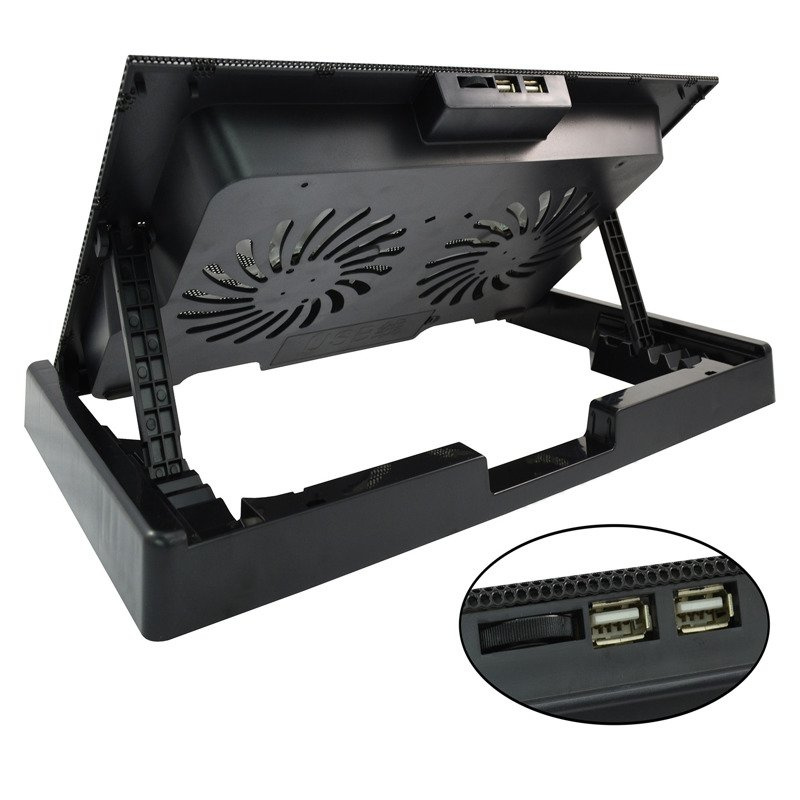
It is a sturdy pad for large laptops – its weight of 820 g ensures stability. At the lowest speed it is practically inaudible (Super Silent mode). A rotary knob switches the pad on and adjusts the fan speed smoothly. The rear support offers 5-level tilt adjustment, so you can easily set a comfortable angle. Extra feet raise the rear of the pad slightly for more comfortable typing. Front stoppers keep the laptop from sliding off when the pad is tilted. It also has 2 USB 2.0 ports.

AABCOOLING NC80 laptop cooling pad

Key features

  • Fans: 2 × 125 mm, blue LED lighting
  • Quiet operation from 11 dB(A), hydraulic bearings
  • Super Silent mode at the lowest speed
  • Rotary knob for switching on and smooth speed control
  • 2 USB 2.0 ports
  • 5-level tilt adjustment
  • Extra feet for a steeper angle
  • Stoppers prevent the laptop from sliding off
  • USB cable storage compartment
  • Gloss-finish frame
  • Anti-vibration feet – dampen vibrations and do not scratch the desk
  • Plug and Play – USB powered, no drivers required
Laptop on the AABCOOLING NC80 cooling pad

Effective laptop cooling

The fans direct cool air from beneath the pad onto the entire laptop casing. A lower casing and processor temperature protects the laptop from overheating and performance drops, and the profiled pad makes working at a desk more comfortable.

Front stoppers of the AABCOOLING NC80 cooling pad

Compatibility

Recommended for laptops with a screen size from 15.6" to 18.4". The laptop size may differ by a few centimetres – what matters most is that the fans sit under the hottest areas of the casing. Please check the dimensions of the pad in the specifications before buying.

Dimensions of the AABCOOLING NC80 cooling pad

Setup and use

  1. Place the pad on a flat, stable surface such as a desk or table.
  2. Set the rear support to the desired height to get a comfortable tilt angle.
  3. If required, fold out the extra feet to raise the rear of the pad slightly.
  4. Place the laptop on the pad – the front stoppers keep it from sliding off.
  5. Connect the USB cable to a USB port on the laptop or to a USB power adapter – the pad works straight away, no drivers needed.
  6. Switch on the cooling with the knob and set the speed to suit the laptop's load.
USB ports of the AABCOOLING NC80 cooling pad

Specifications

  • Dimensions: 415 × 260 × 35 mm
  • Height (tilt adjustment): 35–180 mm
  • Material: aluminium + plastic, gloss-finish frame
  • Weight: 820 g
  • Fans: 2 × 125 × 125 × 20 mm
  • Lighting: blue LED
  • Fan speed: 0–1200 RPM ±10%
  • Airflow: 115 CFM
  • Noise level: min. 11 dB(A)
  • Bearings: hydraulic
  • Power supply: 5 V DC from a USB 3.0/2.0/1.1 port or a USB power adapter
  • Power consumption: 0.4–0.65 A / 2–3.2 W
  • USB ports: 2 × USB 2.0 (480 Mbit/s)
  • Front stoppers: 2 × 42 × 16 mm
  • USB cable length: 60 cm
  • Service life (MTBF): 50,000 h
  • Recommended laptop size: 15.6"–18.4"
Underside of the AABCOOLING NC80 cooling pad with fans

In the box

  • 1 × AABCOOLING NC80
  • 1 × USB cable
  • 1 × packaging
AABCOOLING NC80 cooling pad – top view
Blue LED fans in the AABCOOLING NC80 cooling pad
Entity responsible for this product in the EU
AAB Armanowski Spółka JawnaMore
ProducerAAB Armanowski Spółka JawnaAddress: Polskiej Organizacji Wojskowej 14Postal code: 98-300City: WieluńCountry: PolenPhone number: +48438433303E-mail: info@aabcooling.com
Responsible entityAAB Armanowski Spółka JawnaAddress: Polskiej Organizacji Wojskowej 14Postal code: 98-300City: WieluńCountry: PolenPhone number: +48438433303E-mail: info@aabcooling.com
Symbol
5901812992024
Producer code
5901812992024
Overall dimensions
415 x 260 x 35~180 mm
Material
Aluminum + Plastic - glossy frame
Weight
820 g
Plug & Play Version
just plug it to make it work
Data Transmission
USB 2.0 up to 480 Mb/s
Voltage
USB 3.0 / 2.0 / 1.1 / 1.0, 5V DC or USB-AC adapter
Power consumption
0,4A~0,65A/ 2W~3,2W
Fans dimension
125 x 125 x 20 mm
Fan quantity
2 x blue LED fan
Fan speed
0 to 1200 RPM ± 10%
Airflow
115 CFM
Noise level
level of 11 dB(A), SUPER SILENT mode
Adjustment of inclination
Five ranges and additional legs providing more angles
Size of two front blocks (bookends)
42 x 16 mm
USB cable length
60 cm
Bearings
Hydraulic
Liftime
50000 h
24 months warranty
24 months warranty
Your previous questions regarding this product
Which laptops is the AABCOOLING NC80 laptop cooling pad suitable for?
The pad is designed for laptops with a screen size from 15.6" to 18.4"; its dimensions are 415 × 260 mm.
How many fans does the AABCOOLING NC80 have and how loud is it?
The AABCOOLING NC80 has 2 × 125 mm fans with blue LED lighting. It runs at a noise level from 11 dB(A) and delivers an airflow of 115 CFM.
How are the fans of the AABCOOLING NC80 controlled?
A rotary knob switches the fans on and adjusts their speed (0–1200 RPM). At the lowest speed the pad runs in Super Silent mode.
How is the tilt angle of the AABCOOLING NC80 adjusted?
The tilt angle can be adjusted in 5 positions and also with additional feet. Front stoppers prevent the laptop from sliding off.
How is the AABCOOLING NC80 connected and powered?
The pad is Plug and Play and requires no drivers – it is powered with 5 V from the laptop's USB port or from a USB power adapter. It also has 2 additional USB 2.0 ports.
Do you need help? Do you have any questions?Ask a question and we'll respond promptly, publishing the most interesting questions and answers for others.
Ask a question
If this description is not sufficient, please send us a question to this product. We will reply as soon as possible. Data is processed in accordance with the privacy policy. By submitting data, you accept privacy policy provisions.
Write your opinion
Your opinion:
5/5
Add your own product photo:
pixel