Choose your languageand country
German
English
Polish
OK
AABCOOLING Elektra
AABCOOLING Elektra
AABCOOLING Elektra
AABCOOLING Elektra
AABCOOLING Elektra
AABCOOLING Elektra
AABCOOLING Elektra
AABCOOLING Elektra
AABCOOLING Elektra
AABCOOLING Elektra
AABCOOLING Elektra
AABCOOLING Elektra
AABCOOLING Elektra
AABCOOLING Elektra
Recommended

AABCOOLING Elektra

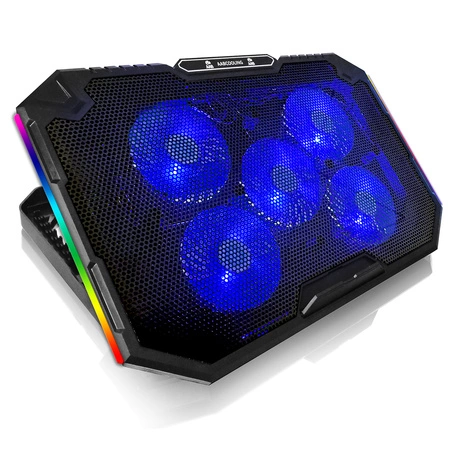
  • AABCOOLING Elektra – laptop cooling pad for 10"–17" laptops: 5 fans (92 mm), quiet operation from 18 dB(A), tilt adjustable in 7 positions, RGB lighting. USB powered, Plug and Play.

£15.61

incl. VAT / 1piece
Lowest price in 30 days before discount: / piece
Regular price: / piece
:
You can buy for pts.
of
You can also buy using:
Contact the shop staff, in order to estimate time of preparing this product for shipment.
Shipment
30 days for easy returns
Safe shopping
After purchase you will receive pts.

Laptop cooling pad AABCOOLING Elektra

The AABCOOLING Elektra is a laptop cooling pad equipped with 5 fans (92 mm). The fans draw in air from below and direct it at the underside of the laptop, lowering the temperature of the casing and components. This keeps your laptop running stably even under heavy load – at work and while gaming.

Laptop cooling pad AABCOOLING Elektra – overview

Key features

  • 5 fans (92 mm) with blue LEDs – airflow up to 85 CFM
  • Quiet hydraulic bearings – noise level from 18 dB(A)
  • Stepless fan speed control with a rotary knob
  • Side RGB lighting switched on and off with a button
  • Additional USB port on the pad – e.g. for a mouse or a flash drive
  • Tilt angle adjustable in 7 positions – a more comfortable position for typing and viewing the screen
  • Fold-out front stop, 15 mm high, keeps the laptop from sliding off
  • Metal mesh traps dust that would otherwise end up in the laptop's cooling system
  • Flexible feet dampen vibrations and do not scratch the desk
Laptop cooling pad AABCOOLING Elektra – dimensions and compatible laptop sizes

Use and compatibility

The pad fits laptops with screen sizes from 10" to 17". It is Plug and Play – powered with 5 V from the laptop's USB port or a USB mains adapter, with no drivers required. Raising the laptop at an angle improves ergonomics: the screen sits higher and the keyboard is more comfortable to use. Dust can easily be removed from the pad with compressed air, e.g. AABCOOLING Compressed Gas Duster.

Laptop cooling pad AABCOOLING Elektra – illuminated fans

Connection and operation

  1. Set the pad to the desired height and place your laptop on it.
  2. Connect the USB cable to a USB port on your laptop or to a USB mains adapter.
  3. Turn the controller knob clockwise to start the fans and set the desired speed. The knob is located at the back of the pad, next to the USB ports.
  4. To switch the side RGB lighting on or off, hold the button next to the knob for 3 seconds.
Laptop cooling pad AABCOOLING Elektra – tilt angle adjustment

Technical specifications

  • Dimensions (W × D × H): 410 × 270 × 34 mm
  • Height in tilt positions: 90 / 115 / 135 / 150 / 160 / 170 / 180 mm
  • Material: ABS + metal mesh
  • Weight: 950 g
  • Fans: 5 × 92 × 92 × 15 mm
  • Rotational speed: 1200–1500 RPM ±10%
  • Airflow: 50–85 CFM
  • Noise level: 18–25 dB(A)
  • Bearings: hydraulic
  • Front stop (W × H): 87 × 15 mm
  • Power supply: 5 V DC from a USB 3.0/2.0/1.1 port or a USB mains adapter
  • Power consumption: 5 V DC / 0.75–1.2 A / 3.75–6 W ±10%
  • Data transfer: USB 2.0, up to 480 Mb/s
  • USB cable length: 60 cm
  • MTBF: 20 000 h
  • Compatibility: laptops 10"–17"
Laptop cooling pad AABCOOLING Elektra – airflow from the fans
Laptop cooling pad AABCOOLING Elektra – design details
Laptop cooling pad AABCOOLING Elektra – with a laptop

Package contents

  • 1 × AABCOOLING Elektra
  • 1 × USB power cable
Entity responsible for this product in the EU
AAB Armanowski Spółka JawnaMore
ProducerAAB Armanowski Spółka JawnaAddress: Polskiej Organizacji Wojskowej 14Postal code: 98-300City: WieluńCountry: PolenPhone number: +48438433303E-mail: info@aabcooling.com
Responsible entityAAB Armanowski Spółka JawnaAddress: Polskiej Organizacji Wojskowej 14Postal code: 98-300City: WieluńCountry: PolenPhone number: +48438433303E-mail: info@aabcooling.com
Symbol
5907678907998
Producer code
5907678907998
Overall dimensions
410 x 270 x 34 mm (width x length x height)
Dimensions in each position
410 x 270 x 90~115~135~150~160~170~180 mm (width x length x height)
Material
Plastic + Metal Grid
Weight
950 g
Data Transmission
USB 2.0 up to 480 Mb/s
Plug & Play Version
just plug it to make it work
Voltage
USB 3.0 / 2.0 / 1.1 / 1.0, 5V DC or USB-AC adapter
Power consumption
5V DC, 0,75A~1,2A / 3,75W~6W +/-10%
Fans dimension
5 x: 92x92x15 mm
Fan speed
92 mm: 1200~1500 RPM +/-10%
Fan quantity
5 x blue LED fan
Airflow
50 ~ 85 CFM
Noise level
18 ~ 25 dB(A)
Front block size (bookends)
87 x 15 mm (width x height)
USB cable length
60 cm
Adjustment of inclination
7-step tilt adjustment
Liftime
20000 h
Bearings
Hydraulic
Additional features
Manual fan speed controller
Side RGB backlight - On/Off control button
Product symbol
NCO094
24 months warranty
24 months warranty
Your previous questions regarding this product
Which laptops is the AABCOOLING Elektra laptop cooling pad suitable for?
The pad is designed for laptops with a screen size from 10" to 17"; its dimensions are 410 × 270 mm.
How many fans does the AABCOOLING Elektra have and how loud is it?
The AABCOOLING Elektra has 5 × 92 mm fans with blue lighting, plus side RGB lighting. It runs at a noise level of 18–25 dB(A) and delivers an airflow of 50–85 CFM.
How are the fans of the AABCOOLING Elektra controlled?
A rotary knob switches the fans on and adjusts their speed (1200–1500 RPM). The side RGB lighting is switched on and off by holding a separate button for 3 seconds.
How is the tilt angle of the AABCOOLING Elektra adjusted?
The tilt angle can be adjusted in 7 positions. A front stopper prevents the laptop from sliding off.
How is the AABCOOLING Elektra connected and powered?
The pad is Plug and Play and requires no drivers – it is powered with 5 V from the laptop's USB port or from a USB power adapter. It also has an additional USB port, e.g. for connecting a mouse or a flash drive.
Do you need help? Do you have any questions?Ask a question and we'll respond promptly, publishing the most interesting questions and answers for others.
Ask a question
If this description is not sufficient, please send us a question to this product. We will reply as soon as possible. Data is processed in accordance with the privacy policy. By submitting data, you accept privacy policy provisions.
Write your opinion
Your opinion:
5/5
Add your own product photo:
pixel